

Table of Contents
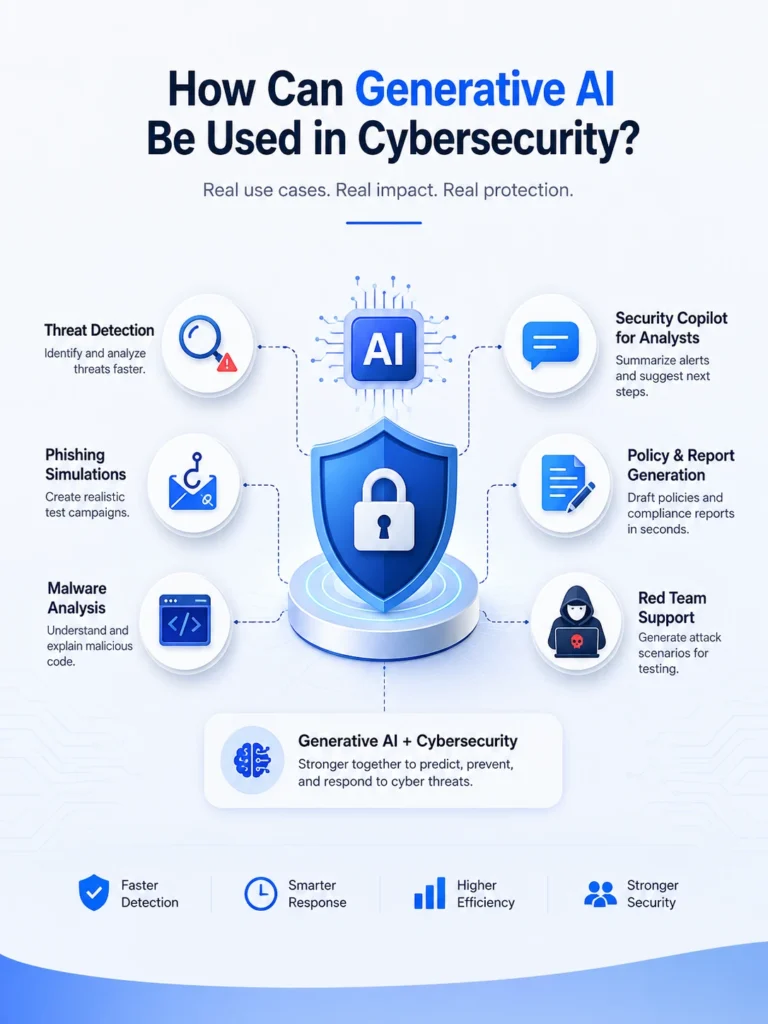
How can generative AI be used in cybersecurity? In short, it writes, summarizes, simulates, and tests. Security teams use it to draft incident reports, summarize threat intel, generate realistic phishing simulations for staff training, write and review code for vulnerabilities, and create synthetic attack data to train detection systems. It does not replace analysts. It gives them a faster starting point and lets them spend more time on the decisions that actually need a human.
That’s the short version. Below is the practical breakdown, including where generative AI genuinely helps and where people give it too much credit.
The most useful applications are not about handing security decisions over to AI. They’re about taking repetitive work off an analyst’s plate. Generative AI can help turn technical information into something easier to understand, generate test scenarios, speed up research, and give security teams a useful first draft instead of starting from scratch.
What Makes Generative AI Different From Regular Cybersecurity AI
Most cybersecurity tools have used some form of AI for years, mainly machine learning models trained to spot patterns in network traffic or flag unusual behavior. That kind of AI is good at recognizing “this looks like the last attack we saw.”
Generative AI is a different animal. It’s built on large language models, the same family of technology behind tools like ChatGPT and Claude. Instead of just recognizing patterns, it can produce new content: text, code, synthetic data, and even conversation. That’s the part that opens up a much wider set of uses in security work, and it’s also the part people misunderstand the most.
If you’re still deciding whether AI is going to take over security jobs altogether, our earlier piece on whether AI will replace cybersecurity covers that question directly. This article focuses on something more specific: what generative AI actually does inside a real security workflow today.
How Can Generative AI Be Used in Cybersecurity: Real Applications
Writing and Simplifying Security Reports
Incident reports and vulnerability write-ups take time, and most analysts would rather be investigating than typing. Organizations also need to consider the risks that come with deploying generative AI itself. NIST’s Generative AI Profile provides a framework for identifying and managing those risks. Generative AI can turn raw log data and technical notes into a clear first draft. A human still checks the facts and finalizes it, but the blank page problem disappears. If you write these reports yourself, our guide on how to write a cybersecurity report pairs well with this, since AI-assisted drafting still needs to follow the same structure a strong report always has.
Simulating Phishing Emails for Staff Training
Security teams need realistic phishing examples to train employees, but writing dozens of convincing fake emails by hand is slow. Generative AI can produce varied, realistic phishing templates for internal training programs, which helps staff recognize real attacks instead of the same three obvious examples they’ve seen a hundred times.
Summarizing Threat Intelligence
Threat intel feeds are dense and constant. Generative AI can read through raw reports, CVE listings, threat reports, and other security intelligence. Then summarize what actually matters for a specific organization. This saves analysts from reading twenty pages to find the two sentences that apply to them.
Reviewing and Writing Code for Vulnerabilities
Generative AI models can scan code and flag common weaknesses, like SQL injection risks or insecure authentication logic, and suggest fixes. It’s not a replacement for a proper code audit, but it catches obvious issues fast and explains them in plain language, which helps less experienced developers actually understand the fix instead of just applying it blindly.
Creating Synthetic Data to Train Detection Systems
Detection models need huge amounts of example data to learn from, including examples of attacks that are rare in the real world. Generative AI can create realistic synthetic attack data, which helps train detection systems on threats that don’t come up often enough in real logs to learn from naturally.
Powering SOC Analyst Copilots
Some newer security platforms include a chat-style assistant that lets analysts ask plain questions like “what happened on this endpoint in the last hour” and get a readable answer based on the logs and security data the platform can access. This doesn’t replace the analyst’s judgment. It just removes the tedious part of digging through raw data by hand.
Supporting Red Team Exercises
Red teams, the people paid to attack a system on purpose to find its weaknesses, use generative AI to brainstorm attack scenarios and write realistic social engineering scripts for authorized testing. This speeds up planning without replacing the human creativity that a real red team engagement needs.
Generative AI Use Cases in Cybersecurity
| Use Case | What It Does | Who Uses It |
|---|---|---|
| Incident report drafting | Turns raw notes and logs into a readable first draft | SOC analysts, incident responders |
| Phishing simulation | Generates varied, realistic training emails | Security awareness teams |
| Threat intel summarization | Condenses long reports into relevant takeaways | Threat intelligence analysts |
| Code vulnerability review | Flags common code weaknesses and explains fixes | Developers, application security teams |
| Synthetic attack data | Creates training data for rare attack types | ML/detection engineers |
| SOC copilot chat tools | Answers plain-language questions about logs and alerts | Tier 1 and Tier 2 analysts |
| Red team scenario planning | Drafts attack scenarios and social engineering scripts | Penetration testers, red teams |
How Is Cybersecurity AI Being Improved
It’s not just about building bigger models. The biggest improvements are happening in the quality of training data, human feedback, real-world testing, and how AI tools connect with the security systems analysts already use. Some vendors are training and testing systems with real-world, anonymized security data rather than relying entirely on lab-generated examples. The goal is to make their systems more useful against the kinds of attacks security teams actually encounter. Human feedback loops are also a big part of it. When an analyst marks an AI’s alert as a false positive, that correction feeds back into the model, so the system gets sharper over time instead of repeating the same mistakes.
Integration is another area of real progress. Newer AI tools plug directly into SIEM platforms and ticketing systems instead of running as a separate tool analysts have to check manually. That alone cuts down on the tab-switching that used to eat up half a SOC shift. If you’re new to what a SOC role actually looks like day to day, our guide on what a cybersecurity analyst does is a good next read.
Which Is Easy: Cybersecurity or Artificial Intelligence?
If you’re choosing between cybersecurity and artificial intelligence, cybersecurity is generally easier to enter, while AI has a steeper technical learning curve. Neither field is easy, but they’re difficult for different reasons.
Cybersecurity has a lower math barrier to entry. You can start in a help desk or SOC role, learn on the job, and pick up certifications as you go. Artificial intelligence and machine learning roles generally expect stronger math and programming skills from day one, especially statistics and linear algebra, which makes the early learning curve steeper.
| Factor | Cybersecurity | Artificial Intelligence / ML |
| Entry barrier | Lower, many entry roles need no degree | Higher, usually needs strong math and coding |
| Common starting point | SOC analyst, help desk, IT support | Data analyst, junior ML engineer |
| Core daily skill | Investigation, judgment, following procedure | Model building, data cleaning, experimentation |
| Certifications that help | Security+, CEH, OSCP | Not certification-heavy, portfolio matters more |
| Long-term overlap | Growing overlap with AI security roles | Growing overlap with AI security roles |
The overlap matters more than the comparison. The fastest-growing roles right now sit exactly between these two fields, securing AI systems and using AI to secure everything else. If you’re mapping out where to start either path, how to get into cybersecurity without prior experience and what cybersecurity roles actually pay are both worth a read before picking a direction.
What Is Not a Way AI Enhances Cybersecurity
It’s just as important to understand what AI does not enhance in cybersecurity. A lot of marketing makes these tools sound more capable than they really are, so knowing their limits matters just as much as knowing their use cases.
AI does not guarantee a breach-free environment. No tool, generative or otherwise, can promise zero incidents. AI does not replace the legal and ethical judgment needed when a company decides how to respond to a breach. AI does not fully understand context the way a human does. So it can miss an attack that technically looks normal but is unusual for that specific company.
AI does not remove the need for basic security hygiene either. Patching, backups, and access control still matter just as much as they did before generative AI showed up. And AI does not secure itself. The models and tools themselves need protection from manipulation, which is a newer risk covered in our beginner’s guide to cybersecurity if you want the fundamentals first.
How to Test AI Cybersecurity Platforms’ Response Accuracy
If you’re evaluating an AI cybersecurity platform, don’t rely on the vendor demo alone. Test how accurately it detects threats, handles unusual activity, summarizes incidents, and explains its decisions before giving it a bigger role in your security workflow.
1. Test It Against Known Attacks:
Run known attack samples through it first. Use publicly documented attack patterns and confirm the tool actually flags them, not just the easy, obvious ones.
2. Measure False Positives:
Check the false positive rate over a real work week, not a one-hour trial. A tool that flags everything looks accurate in a five-minute demo and becomes useless once analysts start ignoring its alerts from alert fatigue.
3. Test Unsusal Activity:
Feed it a deliberately unusual but harmless event, something odd but not malicious, and see if it correctly avoids flagging it. This tells you how well it handles context instead of just pattern matching.
4. Compare Incident Summaries:
Compare its incident summaries against what actually happened, based on a past real incident your team already resolved. If the AI’s version of events matches the real timeline, that’s a strong signal of reliability.
5. Ask About Training Data:
Ask the vendor directly what data the model was trained on and how often it gets retrained. A tool trained on stale data from two years ago will miss newer attack techniques, no matter how good its interface looks.
This same testing approach is also part of a broader shift toward network and system troubleshooting that our network problems guide touches on, since a lot of AI security accuracy issues actually trace back to messy underlying network data.
The Real Limits Nobody Puts in the Sales Deck
Generative AI can hallucinate, meaning it can confidently produce information that sounds right but isn’t. In a security report, that’s not a small bug, it’s a real risk if nobody double-checks the output. It also depends heavily on the quality of the data it’s trained on and fed during use. Feed it messy, incomplete logs, and the summary it produces will be just as messy, only it’ll sound more confident than it should.
None of this means the technology isn’t useful. It means it needs a human checking its work, the same way a junior analyst’s work gets checked by someone more senior.
Try It Yourself Before You Trust It
If you’re considering a generative AI tool for your security team, don’t roll it out company-wide on day one. Run it alongside your existing process for two to four weeks, compare its output against what your analysts catch manually, and only expand its role once you’ve seen it get things right consistently. That single step catches more problems than any vendor case study will show you.
FAQs
Can generative AI write malware?
Generative AI models are built with safeguards meant to block requests for malicious code, though determined attackers have found workarounds in the past. This is exactly why AI security researchers now spend time specifically testing models for this kind of misuse before they’re released.
Do I need coding skills to work with generative AI in cybersecurity?
Not always. Roles like security awareness training or report writing can use AI tools with little to no coding. Roles focused on building or fine-tuning detection models do need programming and data skills.
Is it safe to paste real company logs into a public AI chatbot?
No, not without checking your company’s data policy first. Public AI tools may store or use submitted data depending on their settings, so sensitive logs and incident details should only go into enterprise-grade tools with proper data agreements in place.
Will generative AI replace human penetration testers?
Not completely. Generative AI can help penetration testers brainstorm attack scenarios, prepare social engineering exercises, analyze findings, and automate repetitive parts of an engagement. However, human penetration testers still need to understand the target environment, make judgment calls, validate findings, and adapt when an attack does not behave as expected. AI is more likely to change how penetration testing is performed than eliminate the need for skilled testers.